The world of artificial intelligence (AI) can sometimes seem complex and inaccessible, but the Tygron Platform proves that this does not have to be the case. With a focus on open source and accessibility, Tygron enables users to develop, train and apply AI models themselves. In this blog, we show how easy it is to get started with AI and how Tygron supports this.

AI
Why open source is important
Tygron strongly believes in sharing knowledge and technology. That is why the neural networks and training data they develop are published as open source. This means that everyone has access to the tools and data to create their own AI models. By using open standards such as ONNX (Open Neural Network Exchange), users can easily integrate their own trained models into the Tygron Platform. This fosters innovation and collaboration, both within and outside the AI community.
How accessible is AI on the Tygron Platform?
Building and applying your own AI model consists of 3 steps:
Creating your training data;
Training your model;
Applying your model;
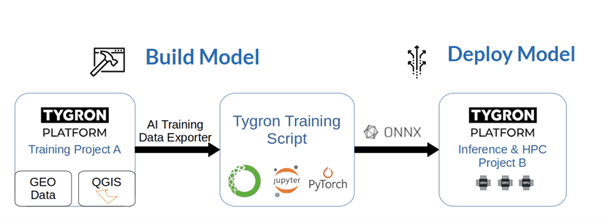
1. To train your model, you need a GIS program, such as QGIS. If your goal is to recognize objects on satellite photos, you can export a high-quality satellite map via the Tygron Platform. After that, you can outline the objects on the satellite map in your GIS program. Once you have created enough training data, you load it into Tygron. You can then export this training data from the platform in a way that it can be loaded directly as training data.
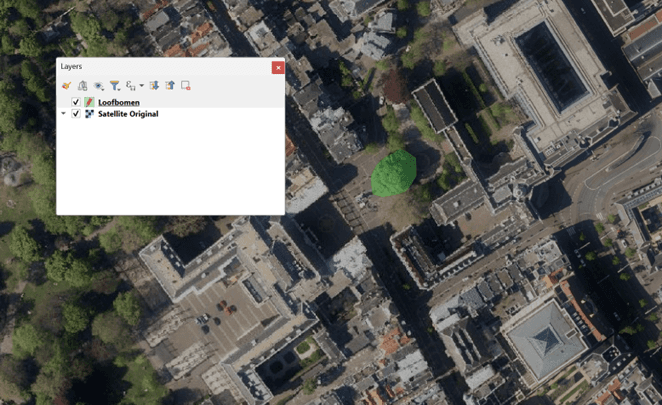
Figure 1 Example of creating training data in QGIS.
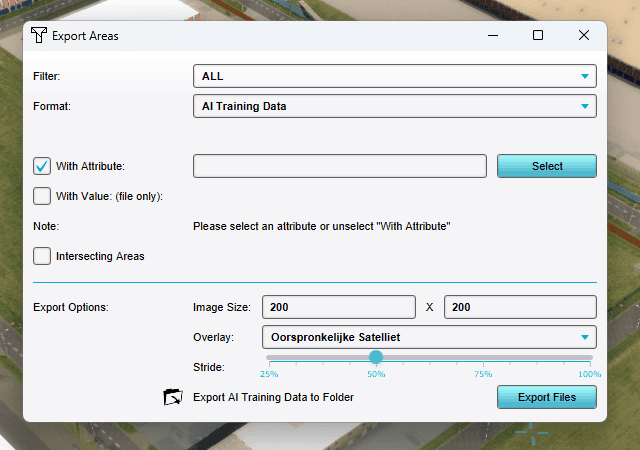
Figure 2. Special export function in the Tygron Platform to export the training data in the correct way.
2. To train your model, you need software in addition to your training data. The easiest way is to use the Anaconda software environment for this. In Anaconda, you can work with Python scripts and JupyterLab.
You can download our step-by-step plan via GitHub. In fact, this is a repository with scripts and datasets that you need to train a neural network (GitHub – Tygron/tygron-ai-suite). Based on the step-by-step plan (How to train your own AI model for an Inference Overlay – Tygron Preview Support Wiki), you can train your own AI model. The type of AI model you train is an RCNN model.
Afterwards, you can export and save your model as an ONNX file.
3. The final step is executing your AI model. To do this, you need to upload the saved ONNX file to the Tygron Platform. With the new AI Inference Overlay, you can link your AI model to maps on which you want to apply your model. If that is, for example, the satellite map, you link this map to the AI Inference Overlay (Inference Overlay – Tygron Preview Support Wiki). The Inference Overlay then executes your AI model.
With this step-by-step plan, both beginners and experts can get started. In the process of training the model and executing the model, beginners can use the default settings, and the expert in turn has plenty of parameters to play with to improve the trained model.
Practical applications of AI
The possibilities of AI on the Tygron Platform are broad. A practical example is deploying an AI model for the Vallei en Veluwe water board to improve water management on the Veluwe. We generated an AI model to produce detailed maps of vegetation and soil structures based on satellite imagery. This not only showed that traditional maps are inaccurate, but this method also provides much more accurate data, making infiltration capacity and micro-relief clearer. This helps in making simulations and ultimately in taking the most targeted measures (see also How do we use AI to better retain precipitation where it falls?).
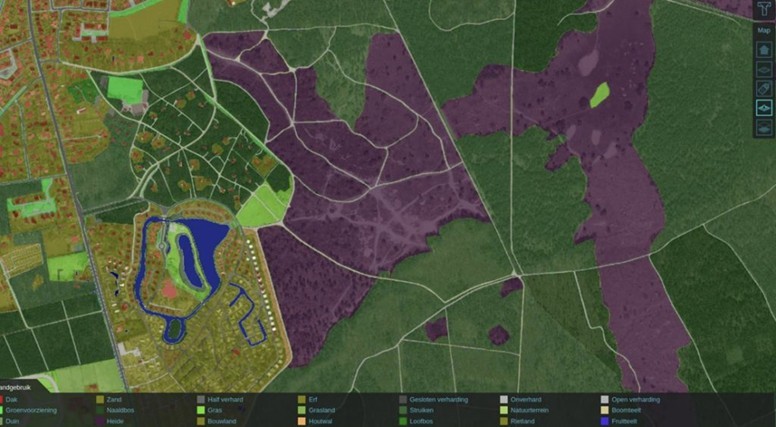
Figure 3 The traditionally used topographic map

Figure 4 The map generated with the AI model
Some other examples are:
Improving tree data, for example by supplementing tree data from public sources with data on private properties.
Improving geographic information on watercourses and structures in the water boards' registers.
Identifying pedestrian crossings and walking routes to map mobility more effectively.
These applications demonstrate that AI is not just theoretical, but also contributes directly to practical solutions.
Collaboration with educational institutions
Tygron works closely with universities and universities of applied sciences to spread knowledge about AI. Students receive free licenses to experiment with the platform, learning how to create, train, and apply neural networks. This contributes to the development of a new generation of experts who are familiar with AI technology.
Conclusion
AI does not have to be magical or complicated. The Tygron Platform offers an accessible way to get started with this technology yourself. Thanks to the open source approach and practical tools, anyone can experiment, learn, and contribute to innovative solutions. So what are you waiting for? Dive into the world of AI and discover how you can improve your data and enhance your analyses!
The functionality described here is available on our Preview Server.
If you are interested in getting started on the Preview Server yourself, request access by sending a message via the contact page on this site or by sending an email to support@tygron.com
Also view the available documentation such as AI Suite, Demo training data.
Do you have any questions? We are happy to help you via support@tygron.com.

